

So, closing or consolidating a data center? Here is a hardware exit checklist to help avoid some common surprises.
You can have a budget approved for your data center retirement and walk away feeling like the numbers check out, right up until you open a rack door and see rows of equipment that actually contain much more valuable hardware than your spreadsheet accounts for.
Maybe the asset list says these are “scrap” items, but they look fairly new. Maybe they have modern processors, populated DIMMs, and clean drive trays. If you want to be sure about those recovery numbers before signing off on a write-off, here is how to ensure finance, IT, and procurement have seen what’s really in the rooms being decommissioned.
When you prepare for data center liquidation, separating the equipment with a resell opportunity from the equipment that should go directly to recycling is a huge factor in the final number. It’s a bigger deal than getting a competitive bid at the last minute. Here’s how to find the money hiding in your data center decommissioning budget.
Could Servers Marked for Scrap Still Have Marketable Parts?
Just because a cluster of servers has moved to a different purpose doesn’t mean it shouldn’t be salvaged. An entire rack of populated 2U servers with recent CPUs, large amounts of memory, redundant power supplies, and rails may still have value, either as full units or individual components.
The fact that there’s a piece of paper hanging off the rack ear with the word “decom” written on it isn’t going to affect the demand for perfectly usable memory modules (how computer memory works). Ask for detailed specs for every server line item in the spreadsheet.
Some things to include are:
- CPU model and count
- total memory and individual module sizes
- drive types, sizes, and if caddies are included
- network cards, GPU cards, rails, and power supplies
- boot errors, missing bezels, bent rack ears, and damaged ports
A stack of 24 fully populated servers doesn’t look all that special from the middle of the aisle, but pick one unit out and bring it closer to the light and you might see very expensive DIMMs behind a dusty fan cover. If the spreadsheet just says “servers, mixed condition,” then you are likely looking at a much lower value than the potential recovery would be.
Missing Accessories Erase Storage Value
Storage gear is often listed by shelves, controllers, and bays. If the inventory only says there are two shelves, a controller, and several bays, it doesn’t tell the buyer what is needed to make it all work.
A bare shelf without any caddies might be worth something to a parts cannibalizer, but it won’t fetch nearly as good of a price as a system with all the proper controllers, power supplies, cabling, and matching drives. There are a lot of small items that tend to get thrown into a box somewhere during deinstallation.
Don’t lose the controller, SFPs, bezel keys, rail kits, and cables by just tossing them somewhere near an open loading dock. A storage array with controller slots filled with blanks should not be mixed in with a storage array that has two controllers and all the drives seated. That’s ridiculous when you’re trying to offload hardware that’s already dead, old, or doesn’t have most of its proprietary parts. Recycle might be the better bet in these cases. But if the spreadsheet just says “storage, unknown,” how can anyone know what’s actually in the chassis?
Network Gear Resale Windows Are Shrinking
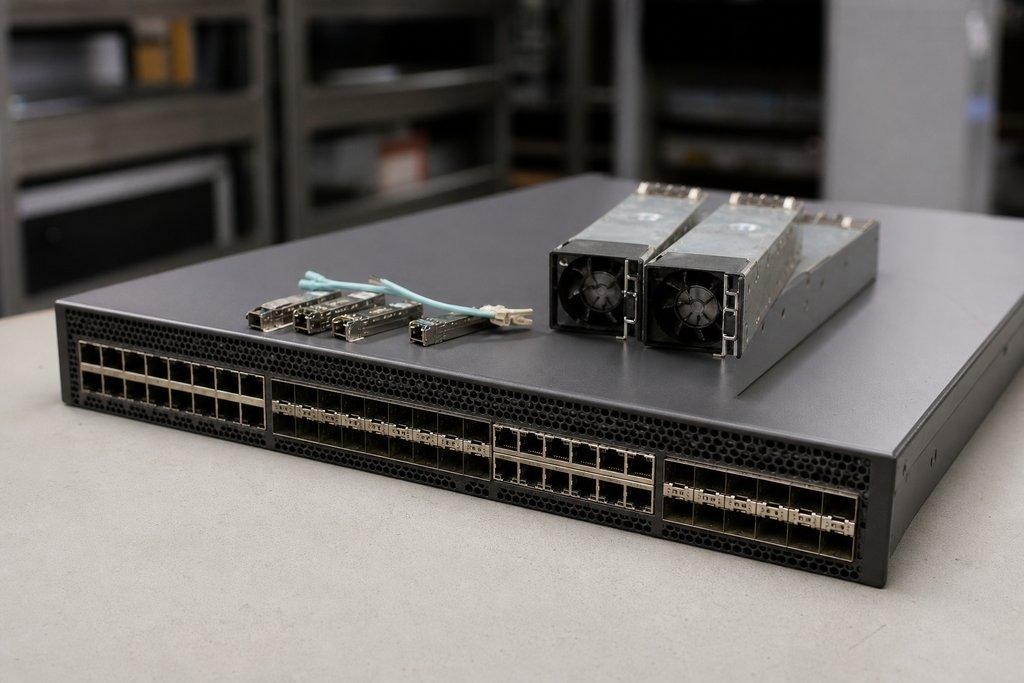
A group of switches that includes optics may be worth more than the basic chassis listing indicates. Support, licenses, port speed, PSU, and optics are just a few of the factors that determine whether a piece of equipment can be resold. Two nearly identical switch stacks can show up in very different value ranges when one is eligible for support and the other isn’t and there’s no path forward for an upgrade.
Make sure IT logs the model number, licenses, serial numbers, installed line cards, and types of optics in the switches before the cables are disconnected. The tech who removes the fiber jumper cables from the patch panel should also confirm whether those transceivers are going into the next installation. If dozens of compatible optics remain in the switch ports, it could significantly change the lot value.
Consider legacy tape systems (how tape libraries work) for contrast. A tape library that no longer has support, contains used magazines, and has obsolete drives may not have much market value despite having a nice exterior appearance. Cartridges, the barcode reader, and the robotic mechanism all need to be evaluated on their own merits. They can’t just be added to a line item with a positive value.
Before the Machines Leave the Building
Meet with finance, purchasing, and the IT owner to review the asset spreadsheet while the equipment is still in place and powered off. Document the model numbers and serial numbers, take photos, check the configurations, note what parts are missing, and identify the lots where removal costs are higher than what the equipment is worth.
Decide whether to remarket, recycle, retain, or evaluate the remaining equipment as soon as possible, before the de-installation team gets there.