

A team that started with three people in one office rarely stays that way. New hires join from other cities, contractors come on for a single project, and within a year the org chart looks nothing like the seating chart ever did. Systems built for a single location start to strain under that kind of growth, often quietly at first, until a single outage or breach makes the gap impossible to ignore.
Choosing the right remote desktop solutions for businesses early avoids a scramble later, when a growing team suddenly needs consistent, secure access to shared systems from a dozen different locations at once.
Among U.S. employees in remote-capable roles, 51% now work hybrid and 27% work fully remote, leaving only about 22% fully on-site, according to Gallup’s most recent workplace data. That split has barely moved in nearly three years, which means it is not a passing phase IT teams can wait out.
Key Takeaways
- Distributed teams need remote desktop tools built for scale, not just a quick fix for a handful of remote employees.
- Gallup data shows roughly 51% of remote-capable U.S. employees now work hybrid, a split that has held steady for nearly three years.
- Evaluating a solution means looking past price and speed claims toward authentication, permissions, and how well it scales.
- Connectivity quality varies by location, so distributed teams should test performance across their actual footprint, not one office.
- The right tool should fit into existing IT and security practices, not force a parallel system nobody fully trusts.
Why Distributed Growth Changes the Evaluation
A tool that works fine for five people in the same city can fall apart once a team spans different countries, time zones, and internet infrastructures. What felt like a convenience for a small team becomes core infrastructure the moment a growing headcount comes to depend on it daily. A password shared casually among three coworkers looks very different once it is quietly copied across thirty inboxes in four countries.
The stakes also change in ways that are easy to underestimate early on. A single outage affecting a handful of colleagues sharing one building is an inconvenience. The same outage affecting fifty people spread across three continents, several of whom are mid-shift while others are asleep, becomes a business continuity problem with no single person available to fix it locally.
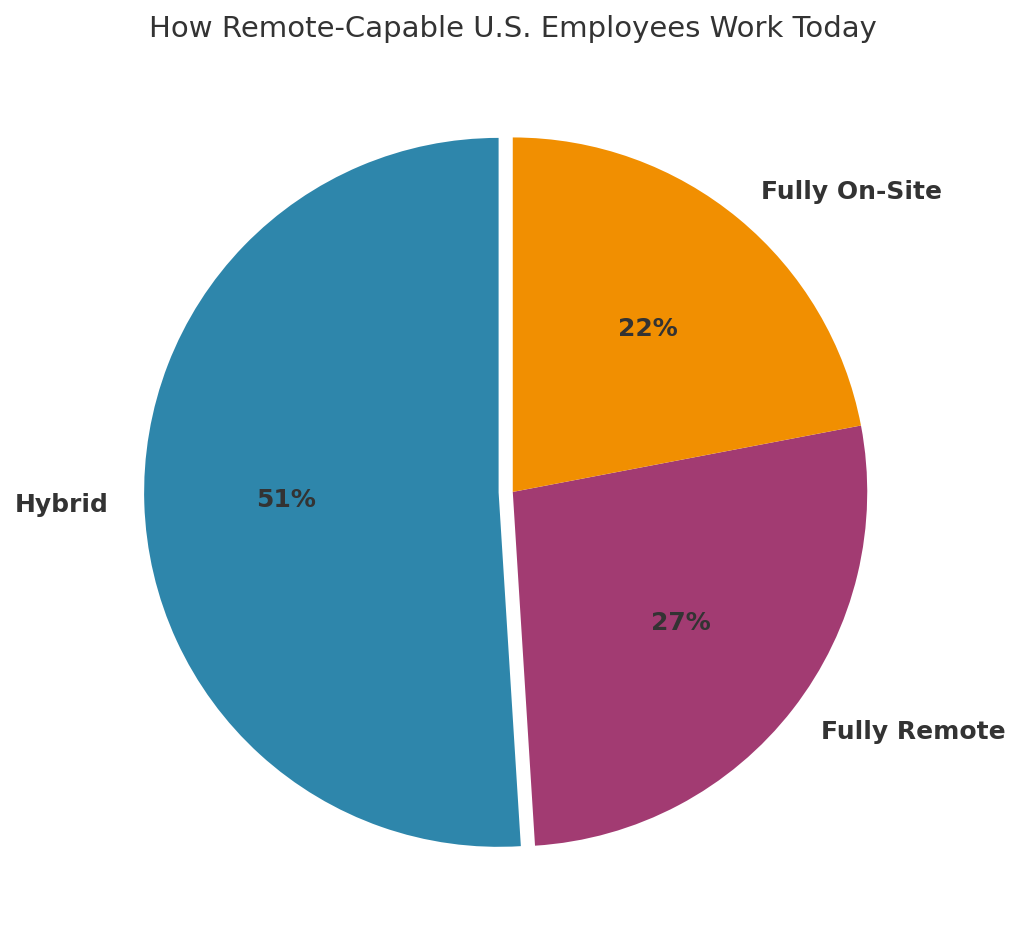
“Remote-capable work has settled into a durable equilibrium: hybrid is the dominant model, fully remote holds nearly a quarter, and only about a fifth of remote-capable employees are fully on-site.” — Gallup, 2025
That stability is exactly why evaluation matters now. Teams are not choosing a stopgap for an unusual year. They are choosing infrastructure that a growing, geographically spread workforce will depend on for the long run.
Reviewing Gallup’s full workplace research confirms this is a durable pattern rather than a temporary blip tied to any single year’s return-to-office headlines.
What to Actually Evaluate in This Kind of Platform
Authentication and Access Controls
A distributed team means more accounts, more devices, and more chances for a weak login to become a real problem. Multi-factor authentication and role-based permissions should be standard, not an upsell reserved for the enterprise pricing tier. A single compromised password should never be enough on its own to reach a system that holds customer data or financial records.
Performance Across Real Locations
Speed varies by geography and connection type. Teams weighing fiber versus 5G home internet for reliability already understand this firsthand: two employees on paper-identical job titles can have very different remote experiences depending on what is available at their address. A platform that feels instant at headquarters can feel sluggish for a teammate three time zones away on a shared rural connection, and no amount of marketing copy changes that physics.
Scalability Without a Full Rebuild
A platform that works for ten users should not require starting over at a hundred. Companies that outsource complex IT work to specialized providers often do so precisely because in-house teams cannot easily rebuild core systems every time headcount doubles, and remote access tooling is no exception.
Fit With Existing Security Practices
A remote desktop tool that operates outside normal account management creates a monitoring gap. Teams already watching for privilege abuse in Active Directory and reviewing how their SIEM correlates alerts across the environment want a remote access platform that reports into the same systems, not a separate blind spot.
Support and Onboarding at Scale
A five-minute setup process matters far less once an IT team is onboarding new hires across several countries every month. Look for centralized deployment options, clear documentation, and vendor support that can actually help when something breaks at 2 a.m. local time for someone on the other side of the planet. Bulk provisioning and deprovisioning also matter more than most buyers expect: a platform that handles one new hire smoothly can still turn into a manual headache when twelve start on the same Monday.
|
Pro Tip: Pilot any candidate platform with your most geographically spread-out team members first, not the group sitting closest to headquarters. Their experience is the real test. |
Small Team Setup vs. Growing Distributed Team Needs
What works for a five-person startup rarely scales cleanly. The table below breaks down how requirements shift as headcount and geography expand.
|
Factor |
Small Co-Located Team |
Growing Distributed Team |
|
Authentication |
Shared or simple logins |
Multi-factor, per-user accounts |
|
Access management |
Manual, ad hoc |
Role-based, centrally managed |
|
Performance needs |
Uniform local network |
Varies by region and connection |
|
Onboarding new users |
Informal setup |
Repeatable, documented process |
|
Security integration |
Standalone tool acceptable |
Must integrate with existing monitoring |
Where Zero Trust Fits Into the Decision
Some growing teams pair their remote desktop platform with a broader access model. Understanding what zero trust network access actually means helps explain why more distributed organisations are moving away from all-or-nothing network access toward verifying every connection individually, regardless of where an employee happens to be working that day.
This does not replace the need for a dedicated remote desktop tool. The two work together: one verifies who is connecting, the other gives them the specific workstation or environment they need to do their job. Teams that treat these as separate, competing purchases often end up paying twice for overlapping coverage while leaving real gaps between the two systems.
A Practical Evaluation Checklist
- List every location and connection type your team currently works from, including home offices and coworking spaces.
- Confirm strong login verification and granular permissions come standard, not as a paid add-on.
- Test the setup with your most distant team members before rolling it out company-wide.
- Check whether the tool integrates with your existing identity and security monitoring systems.
- Ask what onboarding a new hire looks like once your team doubles in size, not just today.
Frequently Asked Questions
How is a remote desktop solution different from a VPN for distributed teams?
A VPN extends network access broadly, while this kind of setup gives a specific person control of a specific machine. Growing teams often need both, layered together rather than treated as interchangeable.
What is the biggest mistake teams make when scaling remote access?
Treating it as a one-time setup rather than infrastructure that needs revisiting. A configuration that worked for ten people rarely holds up cleanly once the team triples in size.
Should every employee have the same level of remote access?
No. Role-based permissions matter more as a team grows, since a support technician and a finance lead have very different legitimate needs for system access.
How often should a distributed team reassess its remote access setup?
At least annually, and after any significant change in headcount, office locations, or the tools the team relies on daily.
Does team size change which features actually matter?
Yes. Small teams can often get by informally, but centralized management, audit logs, and role-based access become essential once dozens of people depend on the same systems.
Is it worth involving IT security early when choosing a remote desktop platform?
Very much so. A platform chosen without security input often has to be replaced later once it becomes clear it does not fit existing monitoring and compliance practices.
Building for the Team You Will Have, Not Just the One You Have Now
The teams that handle distributed growth well tend to make this decision early and revisit it deliberately, rather than reacting once growing pains force the issue. A remote desktop platform chosen with scale in mind saves a painful migration later, and a fair amount of avoidable stress for whoever ends up owning the fix.
Evaluate against where your team is headed, not just where it stands today. The right choice now means one less system to rebuild when the roster looks nothing like it does this year, and one less painful conversation about why access controls never kept pace with headcount.